Registering a Device using iOS or Android for use on "NMU" WiFi Network
Registering a Device using iOS or Android
It is generally recommended you connect your iOS or Android Device to the NMU_WPA network as that network does not require device registration. If you are unable to do so, or the other network is unavailable, then you can also connect it to this network if needed.
Follow this link for NMU_WPA instructions: https://it.nmu.edu/docs/connecting-nmu-wifi-using-nmuwpa-network .
Any device that uses the "NMU" WiFi network must be registered to make full use of the Internet.
Registering a smartphone or tablet that uses iOS or Android is very similar to registering a computer.
Note: iOS 14+ introduced a feature that may cause issues with maintaining a connection to the "NMU" WiFi Network. For help checking for this or fixing this issue, see this article: iOS14+ Private WiFi Addresses.
The following notes are provided but the process and menu choices may be slightly different on your device.
Register an iOS Device
 and select "Wi-Fi".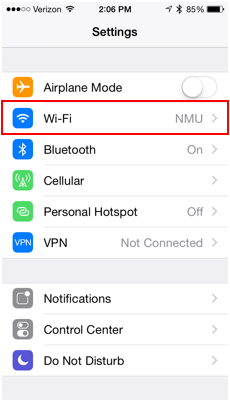
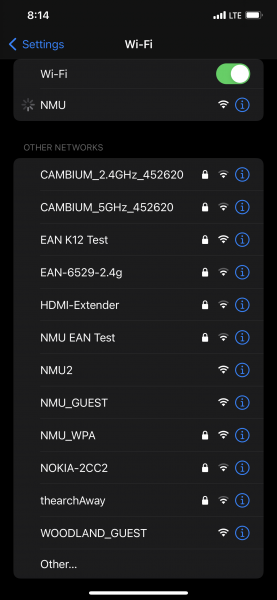
3. Once the device connects to the network, a pop up may appear asking you to register the device. Close the page. Your device will need to have Private WiFi Address disabled before attempting to register it.
6. Open Safari, and in the Address Bar type in "register.nmu.edu/register" (without the quotes) and press enter. You should see the "NOT REGISTERED" message.
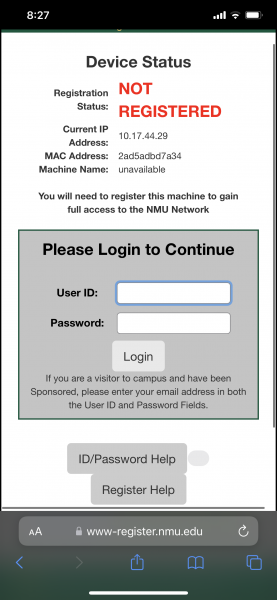
7. Enter your NMU Username (i.e. wildcat without the @nmu.edu part) and your NMU Password then select "Login."
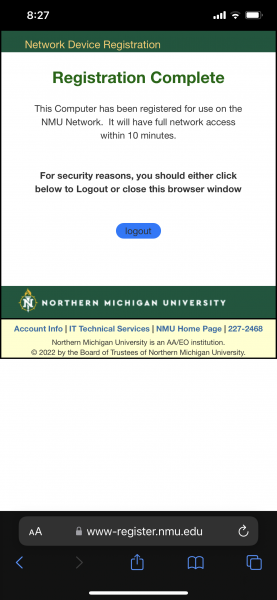
8. Read and accept the Copyright Policy and Acceptable Use Policy.
Register an Android Device
- Find the Settings icon.
- Under the "Connections" tab, select "Wi-Fi."
- Select the "NMU" WiFi network.
- After you successfully connected to the network you will need to register the device by opening an internet browser on your phone. In the URL, type "register.nmu.edu/register" (without the quotes).
- Once you get to the website, it will prompt you for a log in. You will use your NMU Username (i.e. wildcat without the @nmu.edu) and your NMU Password.
- Read and accept the Copyright Policy and Acceptable Use Policy.
- Once your screen shows that you are registered, you may need to wait 5-15 minutes to be granted full internet access.